How to Check the Expiry Date of Your Saudi Driving License
It is essential to regularly check the validity of your driving license to avoid any potential problems or penalties. By knowing the expiration date of your license, you can make sure that it remains valid and avoid any legal issues that may arise from driving with an expired license.
There are several ways to check the expiration date of your Saudi driving license. In this article, we have discussed 4 different methods to check Saudi Driving License
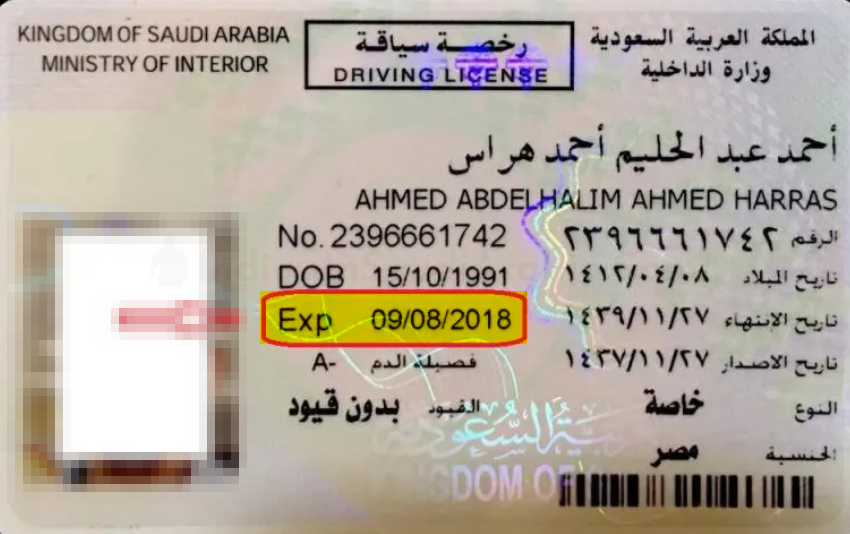
Check Physical Saudi Driving License Card
The simplest way to check the expiry date of your Saudi driving license is to look at the physical card. The expiry date is printed in Gregorian format, so you don’t need to convert it from the Hijri calendar. To check the expiry date of your driving license, simply locate the expiration date on the card and make sure that it is still valid. If your license is about to expire or has already expired, you will need to renew it to continue driving legally in Saudi Arabia.
Check Expiry Date without Absher Account Online
To check the validity of a driving license without an Absher account, follow these steps:
-
Open the “Driving License Query” page.
-
Enter the Iqama number and select the Gregorian calendar type.
-
Select the date of birth as written on the Iqama.
-
Enter the image code and click on the ”+” sign.
-
Check the Saudi driving license information to view the expiry date and other details.


Check Expiry Date via Absher Account Online
In order to check the validity of your Saudi Driving License through Absher;
-
Log in to your Absher account https://www.absher.sa/
-
Click on the “Inquiries” under the “My Services” tab.
-
Select the “Traffic” option.
-
Click on the “Driving License Information” button.
-
The Next Page will list the expiry date of your driving license in Saudi Arabia.
Check Driving License through Tawakkalna App
To check the validity and issue date of a Saudi driving license using the Tawakkalna application, follow these steps:
-
Download the Tawakkalna Services application from the Google Playstore or Apple iTunes.
-
Log in to the app using your Absher ID and password.
-
Click on “Digital Document” and then on “Family Members”.
-
The app will display your digital driving license, including the issue and expiry dates.

💬 Join Our WhatsApp Community
Get updates, ask questions, and connect with fellow Indians in Saudi Arabia.
Join Now →